> ## Documentation Index
> Fetch the complete documentation index at: https://docs.odella.ai/llms.txt
> Use this file to discover all available pages before exploring further.
# Raise Event Block
> Trigger events within your flow for host project interaction or flow synchronization
## Overview
The Raise Event Block allows you to trigger events from within your flow. These events can be listened for by the host project or by a [Wait For Event Block](/block-reference/advanced/wait-for-event) within the same flow. This functionality is useful for:
* Triggering actions in your host application based on the flow's state
* Synchronizing different parts of your flow
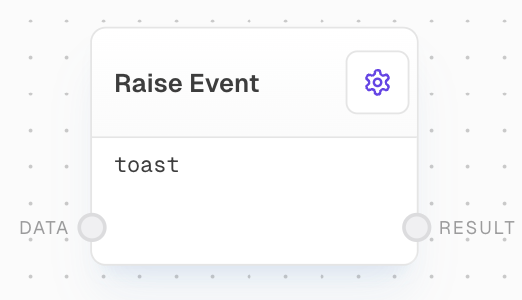
The block requires an event name and optionally accepts event data. The event name identifies the event when raised, while the event data can include any additional information you want to associate with the event.
 ## Inputs
The name of the event to raise. This input is only available if `Use Event Name Input` is enabled in the settings. Any non-string inputs will be automatically coerced to strings.
The data to associate with the event. Optional. Can be any data type.
## Outputs
Returns the same data that was provided to the Data input. If no data was provided, returns an empty string.
## Editor Settings
The name of the event to raise. Required if `Use Event Name Input` is disabled. Defaults to "toast".
When enabled, allows the Event Name to be provided via an input port instead of being set in the settings.
## Block Body Display
The block body will either display:
* The configured event name (when using settings)
* "(Using Input)" (when using the Event Name input port)
## Examples
### Example 1: Using the Toast Event
1. Create a Text Block with the content "Hello, world!".
2. Add a Raise Event Block and set the Event Name to `toast`.
3. Connect the Text Block to the `Data` input of the Raise Event Block.
4. Run the flow. The `Result` output will be "Hello, world!", and a toast message will appear.
### Example 2: Synchronize Flow Parts
1. Create a [Chat Block](/block-reference/ai/ai) with a prompt "What is your name?" using a [Text Block](/block-reference/data/text).
2. Add a Raise Event Block, set the Event Name to `chat`, and connect the Chat Block's `Response` output to the Raise Event Block's `Data` input.
3. In another part of the flow, add a [Wait For Event Block](/block-reference/advanced/wait-for-event) with the Event Name set to `chat`.
4. Run the flow. The Wait For Event Block will pause execution until the Chat Block completes.
## Error Handling
The Raise Event Block will error if:
* The Event Name is not provided when using the Event Name input
* The Event Name setting is empty when not using the input port
## FAQ
Yes, you can pass data of any type with the event by providing a value to the `Data` input.
If you raise an event with no listeners, it will be raised and immediately discarded without any effect.
The [External Call Block](/block-reference/advanced/http-call) waits for the external call to complete before continuing, while the Raise Event Block continues immediately after raising the event.
## See Also
* [Wait For Event Block](/block-reference/advanced/wait-for-event)
* [External Call Block](/block-reference/advanced/http-call)
* [Chat Block](/block-reference/ai/ai)
* [Text Block](/block-reference/data/text)
## Inputs
The name of the event to raise. This input is only available if `Use Event Name Input` is enabled in the settings. Any non-string inputs will be automatically coerced to strings.
The data to associate with the event. Optional. Can be any data type.
## Outputs
Returns the same data that was provided to the Data input. If no data was provided, returns an empty string.
## Editor Settings
The name of the event to raise. Required if `Use Event Name Input` is disabled. Defaults to "toast".
When enabled, allows the Event Name to be provided via an input port instead of being set in the settings.
## Block Body Display
The block body will either display:
* The configured event name (when using settings)
* "(Using Input)" (when using the Event Name input port)
## Examples
### Example 1: Using the Toast Event
1. Create a Text Block with the content "Hello, world!".
2. Add a Raise Event Block and set the Event Name to `toast`.
3. Connect the Text Block to the `Data` input of the Raise Event Block.
4. Run the flow. The `Result` output will be "Hello, world!", and a toast message will appear.
### Example 2: Synchronize Flow Parts
1. Create a [Chat Block](/block-reference/ai/ai) with a prompt "What is your name?" using a [Text Block](/block-reference/data/text).
2. Add a Raise Event Block, set the Event Name to `chat`, and connect the Chat Block's `Response` output to the Raise Event Block's `Data` input.
3. In another part of the flow, add a [Wait For Event Block](/block-reference/advanced/wait-for-event) with the Event Name set to `chat`.
4. Run the flow. The Wait For Event Block will pause execution until the Chat Block completes.
## Error Handling
The Raise Event Block will error if:
* The Event Name is not provided when using the Event Name input
* The Event Name setting is empty when not using the input port
## FAQ
Yes, you can pass data of any type with the event by providing a value to the `Data` input.
If you raise an event with no listeners, it will be raised and immediately discarded without any effect.
The [External Call Block](/block-reference/advanced/http-call) waits for the external call to complete before continuing, while the Raise Event Block continues immediately after raising the event.
## See Also
* [Wait For Event Block](/block-reference/advanced/wait-for-event)
* [External Call Block](/block-reference/advanced/http-call)
* [Chat Block](/block-reference/ai/ai)
* [Text Block](/block-reference/data/text)