> ## Documentation Index
> Fetch the complete documentation index at: https://docs.odella.ai/llms.txt
> Use this file to discover all available pages before exploring further.
# Wait For Event Block
> Pause flow execution until a specific event is raised, enabling synchronization with external actions or other parts of the flow
## Overview
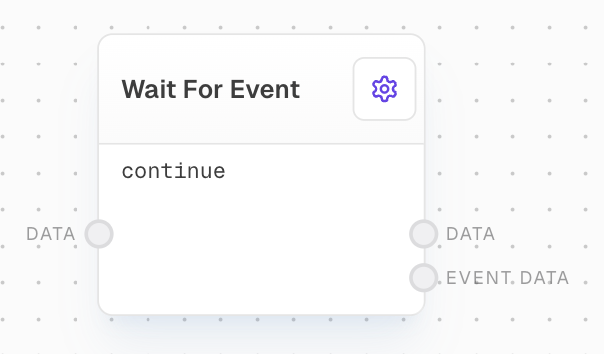
The Wait For Event Block pauses the execution of a flow until a specific event is raised by a [Raise Event Block](/block-reference/advanced/raise-event) or the host project. This block is crucial for scenarios where you need to synchronize your flow with external actions or other parts of the flow.
 ## Inputs
The name of the event to wait for. This input is only available if `Use Event Name Input` is enabled in the settings. The value will be coerced to a string.
Any data to be passed through the block. This data will be outputted from the `Data` output port. Optional.
## Outputs
The data passed in through the `Data` input port, passed through unchanged. If no data was provided to the input, this output will not be available.
The data associated with the event that was raised. The type depends on what data was included when the event was raised. If the event has no associated data, this output will not be available.
## Editor Settings
The name of the event to wait for. Must match the name of the event raised by the Raise Event Block or the host project. Only used if `Use Event Name Input` is disabled.
If enabled, the Event Name can be provided via the Event Name input port instead of being set in the settings.
## Examples
### Example: Synchronizing with a Raise Event Block
1. Create a [Raise Event Block](/block-reference/advanced/raise-event) and set the `Event Name` to `myEvent`.
2. Add a Wait For Event Block and set the `Event Name` to `myEvent`.
3. Connect a Text Block with "Raise Event" to the Raise Event Block's Data input.
4. Connect another Text Block with "Waited" to the Wait For Event Block's Data input.
5. Connect both blocks' outputs to separate Text Blocks.
6. Run the flow. The Wait For Event Block will pause until the Raise Event Block raises `myEvent`.
7. Observe how the Wait For Event Block outputs both its input data and the event data.
## Error Handling
The Wait For Event Block does not generate errors under normal circumstances. If the expected event is not raised, the block will wait indefinitely.
## FAQ
No, each Wait For Event Block can only wait for a single event. To wait for multiple events, use multiple Wait For Event Blocks.
Yes, you can use an [HTTP Call Block](/block-reference/advanced/http-call) to make an API call, then use the Wait For Event Block to wait for an event raised in response to that call.
## See Also
* [Raise Event Block](/block-reference/advanced/raise-event)
* [HTTP Call Block](/block-reference/advanced/http-call)
* [External Call Block](/block-reference/advanced/http-call)
* [Code Block](/block-reference/advanced/code)
## Inputs
The name of the event to wait for. This input is only available if `Use Event Name Input` is enabled in the settings. The value will be coerced to a string.
Any data to be passed through the block. This data will be outputted from the `Data` output port. Optional.
## Outputs
The data passed in through the `Data` input port, passed through unchanged. If no data was provided to the input, this output will not be available.
The data associated with the event that was raised. The type depends on what data was included when the event was raised. If the event has no associated data, this output will not be available.
## Editor Settings
The name of the event to wait for. Must match the name of the event raised by the Raise Event Block or the host project. Only used if `Use Event Name Input` is disabled.
If enabled, the Event Name can be provided via the Event Name input port instead of being set in the settings.
## Examples
### Example: Synchronizing with a Raise Event Block
1. Create a [Raise Event Block](/block-reference/advanced/raise-event) and set the `Event Name` to `myEvent`.
2. Add a Wait For Event Block and set the `Event Name` to `myEvent`.
3. Connect a Text Block with "Raise Event" to the Raise Event Block's Data input.
4. Connect another Text Block with "Waited" to the Wait For Event Block's Data input.
5. Connect both blocks' outputs to separate Text Blocks.
6. Run the flow. The Wait For Event Block will pause until the Raise Event Block raises `myEvent`.
7. Observe how the Wait For Event Block outputs both its input data and the event data.
## Error Handling
The Wait For Event Block does not generate errors under normal circumstances. If the expected event is not raised, the block will wait indefinitely.
## FAQ
No, each Wait For Event Block can only wait for a single event. To wait for multiple events, use multiple Wait For Event Blocks.
Yes, you can use an [HTTP Call Block](/block-reference/advanced/http-call) to make an API call, then use the Wait For Event Block to wait for an event raised in response to that call.
## See Also
* [Raise Event Block](/block-reference/advanced/raise-event)
* [HTTP Call Block](/block-reference/advanced/http-call)
* [External Call Block](/block-reference/advanced/http-call)
* [Code Block](/block-reference/advanced/code)