> ## Documentation Index
> Fetch the complete documentation index at: https://docs.odella.ai/llms.txt
> Use this file to discover all available pages before exploring further.
# Analyze Table Block
> Leverage AI to analyze and transform tabular data based on natural language prompts
 ## Overview
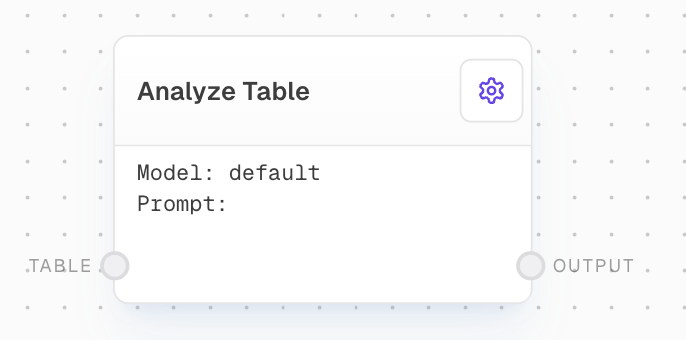
The Analyze Table Block uses AI capabilities to perform complex analysis and transformations on tabular data. By providing a natural language prompt, you can instruct the AI to aggregate data, calculate summary statistics, or perform other sophisticated operations on your input table.
## Inputs
The input table to be analyzed. Should be an array of objects, where each object represents a row in the table.
A natural language prompt describing the analysis or transformation to be performed on the table. This input is only available if "Use Prompt Input" is enabled in settings. The prompt guides the AI in generating the appropriate code for table analysis.
## Outputs
The resulting table after analysis or transformation. The structure of this table will depend on the operations specified in the prompt.
The time in milliseconds that the block took to execute.
## Editor Settings
The specific model to use for generating the analysis code. Available models are dynamically populated based on the LLM provider configuration.
When enabled, allows the prompt to be provided via an input port instead of being set in the settings.
The analysis prompt to use when "Use Prompt Input" is disabled. Describe the analysis you would like to perform on the table. The AI will generate the code for you.
## Requirements
* An LLM provider must be configured in the workflow context
* A code interpreter endpoint must be set in the settings (Azure Code Interpreter)
## Error Handling
The block will retry failed attempts up to 3 times with exponential backoff when encountering errors:
* Retries occur between 500ms and 5000ms apart
* Maximum of 3 retries before failing
* Error details are provided in the trace logs
Common errors include:
* Missing or invalid input table
* Failed code generation from AI
* Runtime errors in generated analysis code
* Missing configuration for LLM provider or code interpreter
Always validate the output of the Analyze Table block, especially when working with critical data or making important decisions based on the results.
## Example Usage
1. Add an Analyze Table block to your flow
2. Connect your input table to the `Table` input
3. Either:
* Enable "Use Prompt Input" and connect a prompt via the input port
* Disable "Use Prompt Input" and enter your analysis prompt in settings
4. Select your desired AI model
5. Run the flow to get the analyzed table output
## FAQ
The block can perform a wide range of operations using pandas, including: aggregations, filtering, sorting, pivoting, calculating summary statistics, and applying complex transformations. The capabilities are largely determined by the AI model's ability to generate appropriate pandas code.
The block automatically handles messy date-time formats in the input data, converting them to appropriate pandas datetime objects for analysis.
The analysis code is executed in an isolated Azure Code Interpreter environment. The data is processed securely within this environment and only the results are returned.
## See Also
* [AI Filter Block](/block-reference/ai/ai-filter)
* [Ask AI Block](/block-reference/ai/ai)
* [Table Block](/block-reference/loaders/read-table)
## Overview
The Analyze Table Block uses AI capabilities to perform complex analysis and transformations on tabular data. By providing a natural language prompt, you can instruct the AI to aggregate data, calculate summary statistics, or perform other sophisticated operations on your input table.
## Inputs
The input table to be analyzed. Should be an array of objects, where each object represents a row in the table.
A natural language prompt describing the analysis or transformation to be performed on the table. This input is only available if "Use Prompt Input" is enabled in settings. The prompt guides the AI in generating the appropriate code for table analysis.
## Outputs
The resulting table after analysis or transformation. The structure of this table will depend on the operations specified in the prompt.
The time in milliseconds that the block took to execute.
## Editor Settings
The specific model to use for generating the analysis code. Available models are dynamically populated based on the LLM provider configuration.
When enabled, allows the prompt to be provided via an input port instead of being set in the settings.
The analysis prompt to use when "Use Prompt Input" is disabled. Describe the analysis you would like to perform on the table. The AI will generate the code for you.
## Requirements
* An LLM provider must be configured in the workflow context
* A code interpreter endpoint must be set in the settings (Azure Code Interpreter)
## Error Handling
The block will retry failed attempts up to 3 times with exponential backoff when encountering errors:
* Retries occur between 500ms and 5000ms apart
* Maximum of 3 retries before failing
* Error details are provided in the trace logs
Common errors include:
* Missing or invalid input table
* Failed code generation from AI
* Runtime errors in generated analysis code
* Missing configuration for LLM provider or code interpreter
Always validate the output of the Analyze Table block, especially when working with critical data or making important decisions based on the results.
## Example Usage
1. Add an Analyze Table block to your flow
2. Connect your input table to the `Table` input
3. Either:
* Enable "Use Prompt Input" and connect a prompt via the input port
* Disable "Use Prompt Input" and enter your analysis prompt in settings
4. Select your desired AI model
5. Run the flow to get the analyzed table output
## FAQ
The block can perform a wide range of operations using pandas, including: aggregations, filtering, sorting, pivoting, calculating summary statistics, and applying complex transformations. The capabilities are largely determined by the AI model's ability to generate appropriate pandas code.
The block automatically handles messy date-time formats in the input data, converting them to appropriate pandas datetime objects for analysis.
The analysis code is executed in an isolated Azure Code Interpreter environment. The data is processed securely within this environment and only the results are returned.
## See Also
* [AI Filter Block](/block-reference/ai/ai-filter)
* [Ask AI Block](/block-reference/ai/ai)
* [Table Block](/block-reference/loaders/read-table)