> ## Documentation Index
> Fetch the complete documentation index at: https://docs.odella.ai/llms.txt
> Use this file to discover all available pages before exploring further.
# Decision Block
> Use AI to make binary decisions based on input values and natural language prompts
## Overview
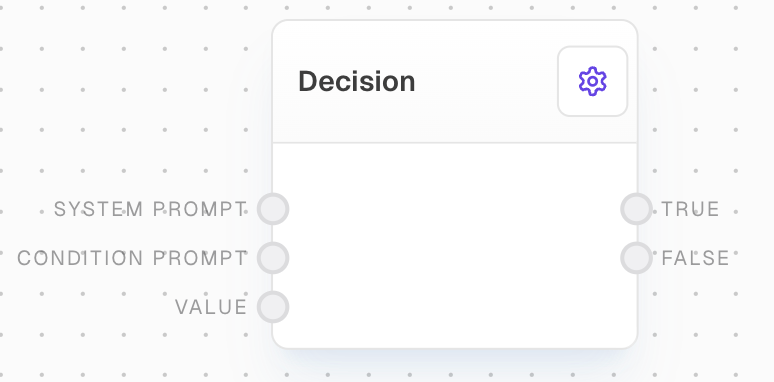
The Decision Block leverages AI capabilities to make binary decisions based on input values and natural language prompts. It acts as an AI-powered equivalent of a traditional switch block, evaluating whether a condition is true or false and directing the flow accordingly.
 ## Inputs
The system prompt to send to the model. Optional. Used to provide high-level guidance to the AI model.
A prompt outlining a TRUE/FALSE decision criteria. Required. The prompt must satisfy a condition to be satisfied.
The value to pass through the True or False port. Required. If unconnected, it will be undefined.
## Outputs
The `value` passed through if the condition is truthy.
The `value` passed through if the condition is falsy.
The total cost of the AI operations in USD.
The time in milliseconds that the block took to execute.
## Editor Settings
When enabled, unconnected values will be excluded from control flow.
The AI model used to evaluate the decision. Available models are dynamically populated based on the LLM provider configuration. Uses a custom LLM dropdown element.
## Error Handling
The block will retry failed attempts up to 3 times with exponential backoff:
* Minimum retry delay: 500ms
* Maximum retry delay: 5000ms
* Retry factor: 2.5x
* Includes randomization
* Maximum retry time: 5 minutes
Error messages will be logged for:
* Invalid responses (must contain TRUE or FALSE)
* Missing LLM provider configuration
* Token limit exceeded errors
* API errors and timeouts
## Example: Categorizing Customer Feedback
1. Add a Decision block to your flow.
2. Connect your input text (customer feedback) to the `Value` input of the Decision block.
3. Add a Text block with a prompt like "Determine if this customer feedback is positive" and connect it to the `Condition Prompt` input.
4. Connect the `True` output to a block that handles positive feedback.
5. Connect the `False` output to a block that handles negative feedback.
6. Run your flow. The Decision block will evaluate each piece of feedback and direct it to the appropriate handling process.
## Notes
* Token counts are checked against model limits before execution
* Costs are calculated per-token based on model pricing
* Responses are case-insensitive but must contain TRUE or FALSE
* System prompts are optional but can help guide the model
* Cache can be enabled/disabled per model configuration
While the Decision block can handle complex decision-making tasks, it's important to validate its decisions for critical applications and provide clear, unambiguous prompts.
## FAQ
Unlike a traditional switch block that uses predefined conditions, the Decision block uses AI to interpret natural language prompts and make decisions based on more complex or nuanced criteria.
The Decision block is designed for binary (true/false) decisions. For more complex decision trees, you can chain multiple Decision blocks together.
The accuracy depends on the clarity of the prompt, the complexity of the decision, and the capabilities of the chosen AI model. It's recommended to test thoroughly and adjust prompts as needed for optimal performance.
## See Also
* [Switch Block](/block-reference/logic/switch)
* [Ask AI Block](/block-reference/ai/ai)
* [AI Filter Block](/block-reference/ai/ai-filter)
## Inputs
The system prompt to send to the model. Optional. Used to provide high-level guidance to the AI model.
A prompt outlining a TRUE/FALSE decision criteria. Required. The prompt must satisfy a condition to be satisfied.
The value to pass through the True or False port. Required. If unconnected, it will be undefined.
## Outputs
The `value` passed through if the condition is truthy.
The `value` passed through if the condition is falsy.
The total cost of the AI operations in USD.
The time in milliseconds that the block took to execute.
## Editor Settings
When enabled, unconnected values will be excluded from control flow.
The AI model used to evaluate the decision. Available models are dynamically populated based on the LLM provider configuration. Uses a custom LLM dropdown element.
## Error Handling
The block will retry failed attempts up to 3 times with exponential backoff:
* Minimum retry delay: 500ms
* Maximum retry delay: 5000ms
* Retry factor: 2.5x
* Includes randomization
* Maximum retry time: 5 minutes
Error messages will be logged for:
* Invalid responses (must contain TRUE or FALSE)
* Missing LLM provider configuration
* Token limit exceeded errors
* API errors and timeouts
## Example: Categorizing Customer Feedback
1. Add a Decision block to your flow.
2. Connect your input text (customer feedback) to the `Value` input of the Decision block.
3. Add a Text block with a prompt like "Determine if this customer feedback is positive" and connect it to the `Condition Prompt` input.
4. Connect the `True` output to a block that handles positive feedback.
5. Connect the `False` output to a block that handles negative feedback.
6. Run your flow. The Decision block will evaluate each piece of feedback and direct it to the appropriate handling process.
## Notes
* Token counts are checked against model limits before execution
* Costs are calculated per-token based on model pricing
* Responses are case-insensitive but must contain TRUE or FALSE
* System prompts are optional but can help guide the model
* Cache can be enabled/disabled per model configuration
While the Decision block can handle complex decision-making tasks, it's important to validate its decisions for critical applications and provide clear, unambiguous prompts.
## FAQ
Unlike a traditional switch block that uses predefined conditions, the Decision block uses AI to interpret natural language prompts and make decisions based on more complex or nuanced criteria.
The Decision block is designed for binary (true/false) decisions. For more complex decision trees, you can chain multiple Decision blocks together.
The accuracy depends on the clarity of the prompt, the complexity of the decision, and the capabilities of the chosen AI model. It's recommended to test thoroughly and adjust prompts as needed for optimal performance.
## See Also
* [Switch Block](/block-reference/logic/switch)
* [Ask AI Block](/block-reference/ai/ai)
* [AI Filter Block](/block-reference/ai/ai-filter)