> ## Documentation Index
> Fetch the complete documentation index at: https://docs.odella.ai/llms.txt
> Use this file to discover all available pages before exploring further.
# Number Block
> Output a constant number value or convert an input value into a number
## Overview
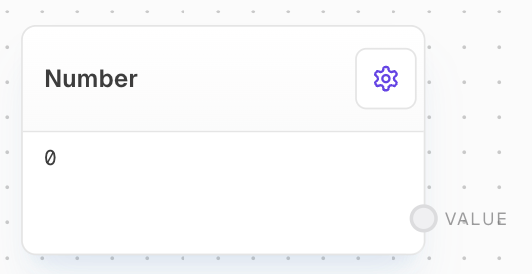
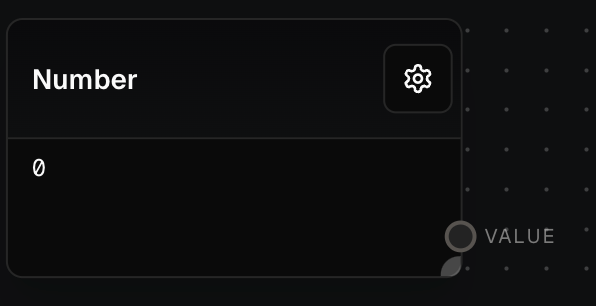
The Number Block is used to output a constant number value or convert an input value into a number. It can also be configured to round the number to a specified number of decimal places.
 ## Inputs
The value to be converted into a number. This input is only available if the "Use Value Input" setting is enabled. If the input cannot be converted to a number, the block will use the Value setting instead.
## Outputs
The output number value. This can either be a constant value or a converted input value.
## Editor Settings
The constant number value to be outputted. This value is used when either:
* The "Use Value Input" setting is disabled
* The "Use Value Input" setting is enabled but no input is connected
* The "Use Value Input" setting is enabled but the input cannot be converted to a number
When enabled, shows an input port that accepts any value and attempts to convert it to a number.
When enabled, rounds the output number to the specified number of decimal places.
The number of decimal places to round to when the "Round" setting is enabled.
## Example: Output a constant number
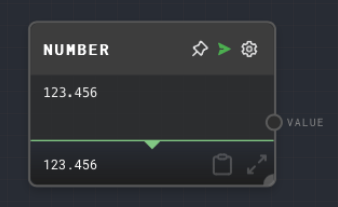
1. Add a Number Block to your flow.
2. Set the `Value` to `123.456`.
3. Run the flow. The `value` output of the Number Block will be `123.456`.
## Inputs
The value to be converted into a number. This input is only available if the "Use Value Input" setting is enabled. If the input cannot be converted to a number, the block will use the Value setting instead.
## Outputs
The output number value. This can either be a constant value or a converted input value.
## Editor Settings
The constant number value to be outputted. This value is used when either:
* The "Use Value Input" setting is disabled
* The "Use Value Input" setting is enabled but no input is connected
* The "Use Value Input" setting is enabled but the input cannot be converted to a number
When enabled, shows an input port that accepts any value and attempts to convert it to a number.
When enabled, rounds the output number to the specified number of decimal places.
The number of decimal places to round to when the "Round" setting is enabled.
## Example: Output a constant number
1. Add a Number Block to your flow.
2. Set the `Value` to `123.456`.
3. Run the flow. The `value` output of the Number Block will be `123.456`.
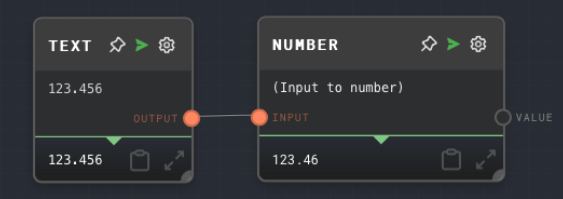
 ## Example: Convert a string to a number
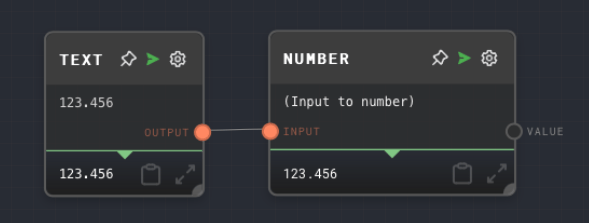
1. Add a Text Block to your flow and set the text to `"123.456"`.
2. Add a Number Block and enable the `Use Value Input` setting.
3. Connect the Text Block to the `input` of the Number Block.
4. Run the flow. The `value` output of the Number Block will be `123.456`.
## Example: Convert a string to a number
1. Add a Text Block to your flow and set the text to `"123.456"`.
2. Add a Number Block and enable the `Use Value Input` setting.
3. Connect the Text Block to the `input` of the Number Block.
4. Run the flow. The `value` output of the Number Block will be `123.456`.
 ## Example: Round a number
1. Add a Number Block to your flow.
2. Set the `Value` to `123.456`.
3. Enable the `Round` setting and set `Round To` to `2`.
4. Run the flow. The `value` output of the Number Block will be `123.46`.
## Example: Round a number
1. Add a Number Block to your flow.
2. Set the `Value` to `123.456`.
3. Enable the `Round` setting and set `Round To` to `2`.
4. Run the flow. The `value` output of the Number Block will be `123.46`.
 ## Error Handling
The Number Block will not error under normal circumstances. If the input value cannot be converted to a number when "Use Value Input" is enabled, it will default to using the Value setting.
## FAQ
Yes, you can use the Number Block to convert a boolean to a number. A `true` value will be converted to `1` and a `false` value will be converted to `0`.
The Number Block will attempt to convert the input value to a number. If the conversion is not possible, the block will default to using the Value setting.
Yes, you can use the Number Block to round a number to an integer by enabling the `Round` setting and setting `Round To` to `0`.
## See Also
* [Text Block](/block-reference/data/text)
* [Bool Block](/block-reference/data/boolean)
* [Compare Block](/block-reference/logic/compare)
## Error Handling
The Number Block will not error under normal circumstances. If the input value cannot be converted to a number when "Use Value Input" is enabled, it will default to using the Value setting.
## FAQ
Yes, you can use the Number Block to convert a boolean to a number. A `true` value will be converted to `1` and a `false` value will be converted to `0`.
The Number Block will attempt to convert the input value to a number. If the conversion is not possible, the block will default to using the Value setting.
Yes, you can use the Number Block to round a number to an integer by enabling the `Round` setting and setting `Round To` to `0`.
## See Also
* [Text Block](/block-reference/data/text)
* [Bool Block](/block-reference/data/boolean)
* [Compare Block](/block-reference/logic/compare)