> ## Documentation Index
> Fetch the complete documentation index at: https://docs.odella.ai/llms.txt
> Use this file to discover all available pages before exploring further.
# Object Block
> Create an object from input values and a JSON template
## Overview
The Object Block creates an object from input values and a JSON template. It automatically escapes input values and inserts them into the template, supporting any data type as input and outputting an object.
 ## Inputs
Input values to be inserted into the JSON template. Input names are dynamically generated from the JSON template based on values wrapped in double curly braces (e.g. `{{input}}`). Non-string inputs are automatically converted to strings.
## Outputs
The object or array created from the input values and JSON template. The type will be `object[]` if the template defines an array, otherwise it will be `object`.
## Editor Settings
The JSON template for creating the object. Input values are inserted into this template using double curly brace syntax (e.g. `{{input}}`). The template must be valid JSON.
Values wrapped in quotes (e.g. `"{{input}}"`) will be treated as strings and escaped appropriately. Values without quotes will be inserted directly as JSON values.
The width of the block in pixels.
Whether the block is hidden in the block menu.
## Example: Creating an object from multiple inputs
1. Add an Object Block and set the JSON Template to:
```json theme={"system"}
{
"name": "{{name}}",
"age": {{age}},
"job": "{{job}}"
}
```
2. Add two Text Blocks with values "John Doe" and "Engineer". Connect to `name` and `job` inputs.
3. Add a Number Block with value 30. Connect to `age` input.
4. Run the flow. The Object Block output will be:
```json theme={"system"}
{
"name": "John Doe",
"age": 30,
"job": "Engineer"
}
```
## Inputs
Input values to be inserted into the JSON template. Input names are dynamically generated from the JSON template based on values wrapped in double curly braces (e.g. `{{input}}`). Non-string inputs are automatically converted to strings.
## Outputs
The object or array created from the input values and JSON template. The type will be `object[]` if the template defines an array, otherwise it will be `object`.
## Editor Settings
The JSON template for creating the object. Input values are inserted into this template using double curly brace syntax (e.g. `{{input}}`). The template must be valid JSON.
Values wrapped in quotes (e.g. `"{{input}}"`) will be treated as strings and escaped appropriately. Values without quotes will be inserted directly as JSON values.
The width of the block in pixels.
Whether the block is hidden in the block menu.
## Example: Creating an object from multiple inputs
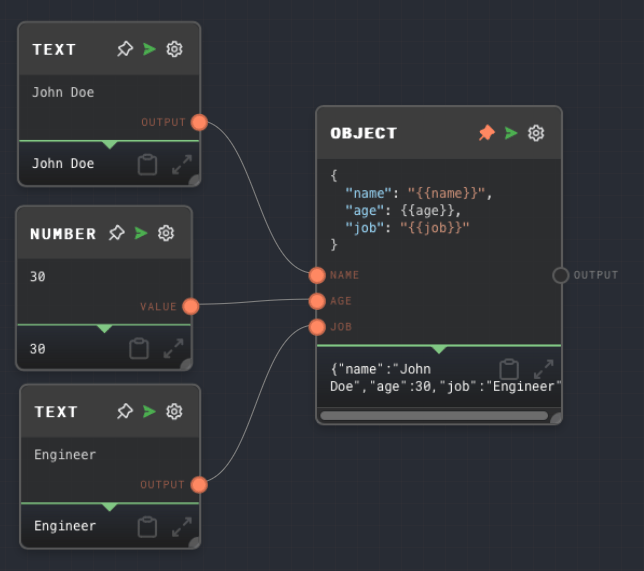
1. Add an Object Block and set the JSON Template to:
```json theme={"system"}
{
"name": "{{name}}",
"age": {{age}},
"job": "{{job}}"
}
```
2. Add two Text Blocks with values "John Doe" and "Engineer". Connect to `name` and `job` inputs.
3. Add a Number Block with value 30. Connect to `age` input.
4. Run the flow. The Object Block output will be:
```json theme={"system"}
{
"name": "John Doe",
"age": 30,
"job": "Engineer"
}
```
 ## Error Handling
The Object Block will error if:
* The JSON Template is not a valid JSON string
* The interpolated JSON string (after inserting input values) is not valid JSON
## FAQ
Yes, set the JSON Template to a valid JSON array string:
```json theme={"system"}
["{{value1}}", "{{value2}}", "{{value3}}"]
```
Input values are automatically escaped based on whether they appear in quotes in the template:
* Values in quotes (e.g. `"{{input}}"`) are escaped as strings using `JSON.stringify()`
* String values in quotes get a single `JSON.stringify()`
* Non-string values in quotes get a double `JSON.stringify()` to properly escape them
* Values without quotes are stringified directly as JSON values
If an input value is null or undefined, it will be converted to `null` in the output JSON.
## See Also
* [Array Block](/block-reference/data/array)
* [Text Block](/block-reference/data/text)
* [Extract Object Path Block](/block-reference/modifiers/extract-object-path)
* [Code Block](/block-reference/advanced/code)
## Error Handling
The Object Block will error if:
* The JSON Template is not a valid JSON string
* The interpolated JSON string (after inserting input values) is not valid JSON
## FAQ
Yes, set the JSON Template to a valid JSON array string:
```json theme={"system"}
["{{value1}}", "{{value2}}", "{{value3}}"]
```
Input values are automatically escaped based on whether they appear in quotes in the template:
* Values in quotes (e.g. `"{{input}}"`) are escaped as strings using `JSON.stringify()`
* String values in quotes get a single `JSON.stringify()`
* Non-string values in quotes get a double `JSON.stringify()` to properly escape them
* Values without quotes are stringified directly as JSON values
If an input value is null or undefined, it will be converted to `null` in the output JSON.
## See Also
* [Array Block](/block-reference/data/array)
* [Text Block](/block-reference/data/text)
* [Extract Object Path Block](/block-reference/modifiers/extract-object-path)
* [Code Block](/block-reference/advanced/code)