> ## Documentation Index
> Fetch the complete documentation index at: https://docs.odella.ai/llms.txt
> Use this file to discover all available pages before exploring further.
# User Input Block
> Prompt users for input during flow execution, enabling interactive workflows
 ## Overview
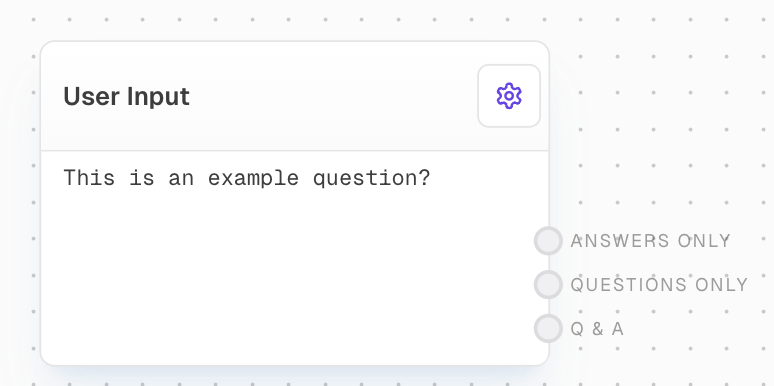
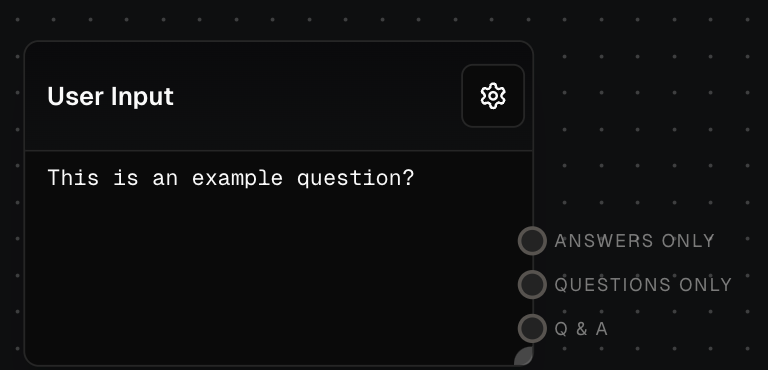
The User Input Block allows you to prompt users for input during flow execution. This block is essential for creating interactive workflows where user input is required to proceed. It can use either static prompts defined in the block settings or dynamic prompts provided via the block's input.
## Inputs
An array of questions to prompt the user. Only available when "Use Input" is enabled.
A value to wait for before showing the input prompt. Only available when "Wait For Input" is enabled.
## Outputs
An array containing just the user's answers to the prompted questions.
An array containing just the questions that were asked.
An array containing the questions and answers formatted as "Question\nAnswer".
## Editor Settings
The message to display to the user when prompting for input. Only editable when "Use Input" is disabled.
When enabled, allows the prompt message to be provided via the questions input port instead of the editor settings.
When enabled, delays showing the input prompt until the "Wait For" input receives a value.
The format to render the prompt in. Options:
* markdown: Renders the prompt as markdown
* preformatted: Renders the prompt as preformatted text
## Examples
### Static Prompt
1. Add a User Input Block to your flow.
2. Set the "Prompt" to "What is your name?" in the block settings.
3. Run the flow. It will pause and prompt the user for input.
4. After the user submits their name, the flow continues with the input as the block's output.
### Dynamic Prompts
1. Add a User Input Block and enable the "Use Input" toggle.
2. Create an Array Block with two Text Blocks: "What is your name?" and "What is your favorite color?"
3. Connect the Array Block to the User Input Block's "Questions" input.
4. Run the flow. It will prompt the user with both questions sequentially.
5. The block's output will be an array containing the user's answers.
## Error Handling
The User Input Block does not typically produce errors as it simply waits for user input. However, if there are issues with the user interface or the block fails to receive a response, it may timeout and return an error.
The User Input Block does not support input masking. Avoid using it for sensitive information like passwords.
## FAQ
Yes, you can use an Array Block connected to the "Questions" input to prompt for multiple inputs sequentially.
If the user submits without providing input, the block will output an empty string for that prompt.
When "Wait For Input" is enabled, the input prompt won't be shown until a value is received on the "Wait For" input port. This allows you to sequence prompts after other operations complete.
* "Answers Only" gives you just the user responses
* "Questions Only" gives you just the questions asked
* "Q & A" combines each question and answer pair with a newline between them
## See Also
* [Array Block](/block-reference/data/array)
* [Text Block](/block-reference/data/text)
* [Split Block](/block-reference/modifiers/chunk)
* [Join Block](/block-reference/modifiers/join)
## Overview
The User Input Block allows you to prompt users for input during flow execution. This block is essential for creating interactive workflows where user input is required to proceed. It can use either static prompts defined in the block settings or dynamic prompts provided via the block's input.
## Inputs
An array of questions to prompt the user. Only available when "Use Input" is enabled.
A value to wait for before showing the input prompt. Only available when "Wait For Input" is enabled.
## Outputs
An array containing just the user's answers to the prompted questions.
An array containing just the questions that were asked.
An array containing the questions and answers formatted as "Question\nAnswer".
## Editor Settings
The message to display to the user when prompting for input. Only editable when "Use Input" is disabled.
When enabled, allows the prompt message to be provided via the questions input port instead of the editor settings.
When enabled, delays showing the input prompt until the "Wait For" input receives a value.
The format to render the prompt in. Options:
* markdown: Renders the prompt as markdown
* preformatted: Renders the prompt as preformatted text
## Examples
### Static Prompt
1. Add a User Input Block to your flow.
2. Set the "Prompt" to "What is your name?" in the block settings.
3. Run the flow. It will pause and prompt the user for input.
4. After the user submits their name, the flow continues with the input as the block's output.
### Dynamic Prompts
1. Add a User Input Block and enable the "Use Input" toggle.
2. Create an Array Block with two Text Blocks: "What is your name?" and "What is your favorite color?"
3. Connect the Array Block to the User Input Block's "Questions" input.
4. Run the flow. It will prompt the user with both questions sequentially.
5. The block's output will be an array containing the user's answers.
## Error Handling
The User Input Block does not typically produce errors as it simply waits for user input. However, if there are issues with the user interface or the block fails to receive a response, it may timeout and return an error.
The User Input Block does not support input masking. Avoid using it for sensitive information like passwords.
## FAQ
Yes, you can use an Array Block connected to the "Questions" input to prompt for multiple inputs sequentially.
If the user submits without providing input, the block will output an empty string for that prompt.
When "Wait For Input" is enabled, the input prompt won't be shown until a value is received on the "Wait For" input port. This allows you to sequence prompts after other operations complete.
* "Answers Only" gives you just the user responses
* "Questions Only" gives you just the questions asked
* "Q & A" combines each question and answer pair with a newline between them
## See Also
* [Array Block](/block-reference/data/array)
* [Text Block](/block-reference/data/text)
* [Split Block](/block-reference/modifiers/chunk)
* [Join Block](/block-reference/modifiers/join)