> ## Documentation Index
> Fetch the complete documentation index at: https://docs.odella.ai/llms.txt
> Use this file to discover all available pages before exploring further.
# If/Else Block
> Choose between two different values based on a condition
 ## Overview
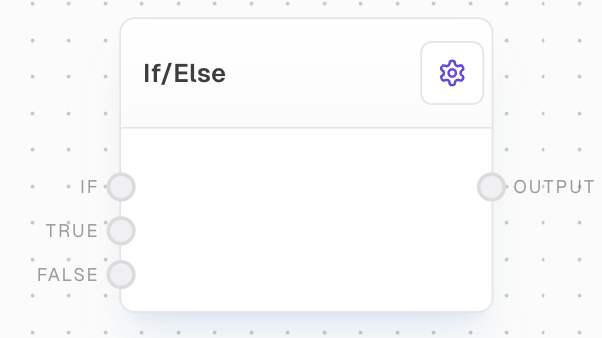
The If/Else Block is a control flow block that allows you to choose between two different values based on a condition. It evaluates a condition and outputs either a "true" value or a "false" value depending on the result.
## Inputs
If this is truthy, the `true` value will be passed through the output port. Otherwise, the `false` value will be passed through the output port. An unconnected port is considered false. A `Not Ran` value is considered false. Required.
The value to pass through the output port if the condition is truthy.
The value to pass through the output port if the condition is not truthy.
## Outputs
The `true` or `false` value, depending on the `if` condition.
## Editor Settings
If enabled, unconnected input ports are control-flow-excluded. If disabled (legacy behavior), unconnected ports will pass through undefined values.
## Example: Choose between two values based on a condition
1. Create a Bool Block and set its value to `true`.
2. Create two Text Blocks with values `Hello` and `World`.
3. Create an If/Else Block. Connect the Bool Block to `If`, `Hello` to `True`, and `World` to `False`.
4. Run the flow. The output should be `Hello`.
5. Change the Bool Block to `false` and run again. The output should now be `World`.
## Error Handling
The If/Else block will not throw an error under normal circumstances. If both the true and false values are unconnected or control-flow-excluded, the output will be control-flow-excluded.
## FAQ
The following values are considered truthy:
* Boolean `true`
* Any non-zero number
* Any non-empty string
* Any non-empty Array
* Any object with a truthy value
* Any function
The following are considered falsy:
* Boolean `false`
* Zero
* Empty string
* Empty array
* null/undefined
* The string value `"false"`
* `Not Ran` values
If the `If` input is `Not Ran`, the `False` value will be passed through instead. If the `False` value is not connected and "Don't run unconnected ports" is enabled, then the result will be control-flow-excluded.
Yes, you can use the If/Else Block to choose between two different types of values. For example, you can use it to choose between a string and a number based on a condition. The output type will match whichever value (true or false) is passed through.
## See Also
* [If Block](/block-reference/logic/if-else)
* [Match Block](/block-reference/logic/match)
* [Coalesce Block](/block-reference/logic/coalesce)
* [Control Flow](/workflow/control-flow)
## Overview
The If/Else Block is a control flow block that allows you to choose between two different values based on a condition. It evaluates a condition and outputs either a "true" value or a "false" value depending on the result.
## Inputs
If this is truthy, the `true` value will be passed through the output port. Otherwise, the `false` value will be passed through the output port. An unconnected port is considered false. A `Not Ran` value is considered false. Required.
The value to pass through the output port if the condition is truthy.
The value to pass through the output port if the condition is not truthy.
## Outputs
The `true` or `false` value, depending on the `if` condition.
## Editor Settings
If enabled, unconnected input ports are control-flow-excluded. If disabled (legacy behavior), unconnected ports will pass through undefined values.
## Example: Choose between two values based on a condition
1. Create a Bool Block and set its value to `true`.
2. Create two Text Blocks with values `Hello` and `World`.
3. Create an If/Else Block. Connect the Bool Block to `If`, `Hello` to `True`, and `World` to `False`.
4. Run the flow. The output should be `Hello`.
5. Change the Bool Block to `false` and run again. The output should now be `World`.
## Error Handling
The If/Else block will not throw an error under normal circumstances. If both the true and false values are unconnected or control-flow-excluded, the output will be control-flow-excluded.
## FAQ
The following values are considered truthy:
* Boolean `true`
* Any non-zero number
* Any non-empty string
* Any non-empty Array
* Any object with a truthy value
* Any function
The following are considered falsy:
* Boolean `false`
* Zero
* Empty string
* Empty array
* null/undefined
* The string value `"false"`
* `Not Ran` values
If the `If` input is `Not Ran`, the `False` value will be passed through instead. If the `False` value is not connected and "Don't run unconnected ports" is enabled, then the result will be control-flow-excluded.
Yes, you can use the If/Else Block to choose between two different types of values. For example, you can use it to choose between a string and a number based on a condition. The output type will match whichever value (true or false) is passed through.
## See Also
* [If Block](/block-reference/logic/if-else)
* [Match Block](/block-reference/logic/match)
* [Coalesce Block](/block-reference/logic/coalesce)
* [Control Flow](/workflow/control-flow)