> ## Documentation Index
> Fetch the complete documentation index at: https://docs.odella.ai/llms.txt
> Use this file to discover all available pages before exploring further.
# Switch Block
> Route control flow based on a boolean condition
 ## Overview
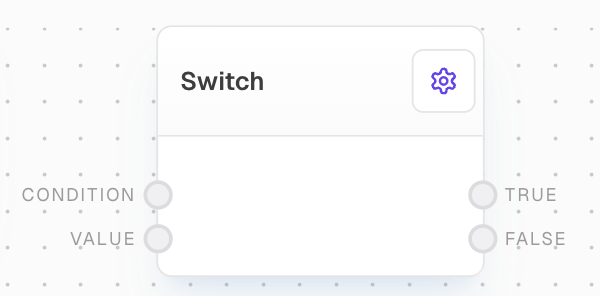
The Switch Block is a control flow block that routes the input value to different outputs based on a boolean condition. It evaluates the condition and directs the value to either the True or False output port accordingly.
## Key Features
* Routes values based on a condition
* Control flow excluded values for unmatched paths
## Inputs
If this is truthy, the value will be passed through the True port. Otherwise, it will be passed through the False port. An unconnected port is considered false.
The value to pass through the True or False port. If unconnected, it will be undefined.
## Outputs
The `value` passed through if the condition is truthy. Control-flow-excluded if condition is falsy.
The `value` passed through if the condition is falsy. Control-flow-excluded if condition is truthy.
## Editor Settings
If enabled, unconnected value input is control-flow-excluded. If disabled (legacy behavior), unconnected value will pass through undefined.
The width of the block in pixels.
## Example: Route a message based on a condition
1. Create a Bool Block and set its value to `true`.
2. Create a Text Block with the value "Hello, World!".
3. Create a Switch Block. Connect the Bool Block to `Condition` and the Text Block to `Value`.
4. Add two Text Blocks to display the output, one connected to True and one to False.
5. Run the flow. The "Hello, World!" message should appear in the Text Block connected to True.
6. Change the Bool Block to `false` and run again. The message should now appear in the Text Block connected to False.
## Error Handling
The Switch block will not throw an error under normal circumstances. The following values are considered falsy:
* Boolean `false`
* Empty string
* Empty array
* Control-flow-excluded values
* Undefined/unconnected inputs
* Empty chat messages
## FAQ
If "Don't run unconnected value" is enabled (default), the value will be control-flow-excluded. If disabled, undefined will be passed through.
The Switch block accepts any input type for the condition and coerces it to a boolean. For complex conditions, you may want to evaluate them before the Switch block.
## See Also
* [If/Else Block](/block-reference/logic/if-else)
* [Match Block](/block-reference/logic/match)
* [Bool Block](/block-reference/data/boolean)
## Overview
The Switch Block is a control flow block that routes the input value to different outputs based on a boolean condition. It evaluates the condition and directs the value to either the True or False output port accordingly.
## Key Features
* Routes values based on a condition
* Control flow excluded values for unmatched paths
## Inputs
If this is truthy, the value will be passed through the True port. Otherwise, it will be passed through the False port. An unconnected port is considered false.
The value to pass through the True or False port. If unconnected, it will be undefined.
## Outputs
The `value` passed through if the condition is truthy. Control-flow-excluded if condition is falsy.
The `value` passed through if the condition is falsy. Control-flow-excluded if condition is truthy.
## Editor Settings
If enabled, unconnected value input is control-flow-excluded. If disabled (legacy behavior), unconnected value will pass through undefined.
The width of the block in pixels.
## Example: Route a message based on a condition
1. Create a Bool Block and set its value to `true`.
2. Create a Text Block with the value "Hello, World!".
3. Create a Switch Block. Connect the Bool Block to `Condition` and the Text Block to `Value`.
4. Add two Text Blocks to display the output, one connected to True and one to False.
5. Run the flow. The "Hello, World!" message should appear in the Text Block connected to True.
6. Change the Bool Block to `false` and run again. The message should now appear in the Text Block connected to False.
## Error Handling
The Switch block will not throw an error under normal circumstances. The following values are considered falsy:
* Boolean `false`
* Empty string
* Empty array
* Control-flow-excluded values
* Undefined/unconnected inputs
* Empty chat messages
## FAQ
If "Don't run unconnected value" is enabled (default), the value will be control-flow-excluded. If disabled, undefined will be passed through.
The Switch block accepts any input type for the condition and coerces it to a boolean. For complex conditions, you may want to evaluate them before the Switch block.
## See Also
* [If/Else Block](/block-reference/logic/if-else)
* [Match Block](/block-reference/logic/match)
* [Bool Block](/block-reference/data/boolean)