> ## Documentation Index
> Fetch the complete documentation index at: https://docs.odella.ai/llms.txt
> Use this file to discover all available pages before exploring further.
# Extract Markdown Code Blocks
> Extract code blocks from markdown-formatted text
 ## Overview
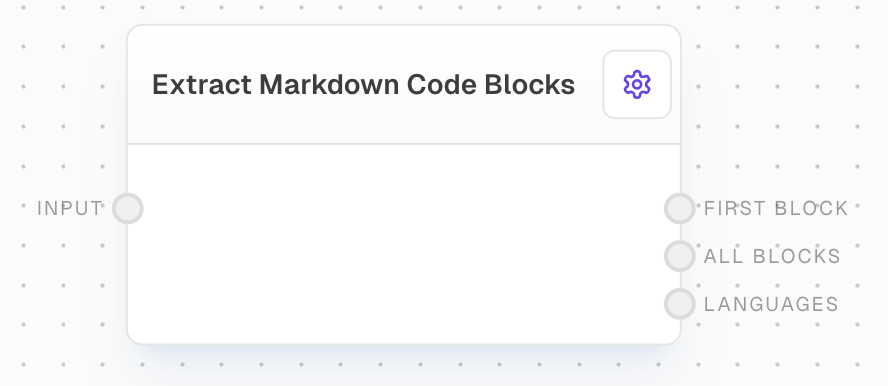
The Extract Markdown Code Blocks block is designed to parse markdown-formatted text and extract all code blocks within it. This is particularly useful when working with documentation, README files, or any text that contains code snippets in markdown format.
## Inputs
The markdown-formatted text from which to extract code blocks.
## Outputs
The first code block found in the input markdown. If no code blocks are found, this output will be control-flow-excluded.
An array of strings, where each string represents a code block extracted from the input markdown.
An array of strings containing the language identifiers specified for each code block. For example, in "\`\`\`python", "python" would be the language identifier.
## Example: Extracting Code from a README
1. Create a new flow and add an Extract Markdown Code Blocks block.
2. Add a Text block with markdown content containing code blocks and connect it to the `input` of the Extract Markdown Code Blocks block.
3. Connect any of the outputs to view the extracted code blocks or language information.
4. Run the flow to see the results.
## Error Handling
* If no code blocks are found in the input markdown, the `firstBlock` output will be control-flow-excluded and `allBlocks` will be an empty array.
* The block will not throw an error for invalid markdown; it will attempt to extract any code blocks it can identify.
## FAQ
The block expects code blocks to be formatted using triple backticks (\`\`\`) as per standard markdown syntax. Both fenced code blocks with optional language identifiers are supported.
Language identifiers are extracted from the opening fence of code blocks (e.g., \`\`\`python). If no language is specified, an empty string is used in the languages array.
No, this block is designed to extract full code blocks, not inline code snippets that are typically wrapped in single backticks.
## See Also
* [Extract JSON Block](/block-reference/modifiers/extract-json)
* [Chunk Block](/block-reference/modifiers/chunk)
* [Text Block](/block-reference/data/text)
## Overview
The Extract Markdown Code Blocks block is designed to parse markdown-formatted text and extract all code blocks within it. This is particularly useful when working with documentation, README files, or any text that contains code snippets in markdown format.
## Inputs
The markdown-formatted text from which to extract code blocks.
## Outputs
The first code block found in the input markdown. If no code blocks are found, this output will be control-flow-excluded.
An array of strings, where each string represents a code block extracted from the input markdown.
An array of strings containing the language identifiers specified for each code block. For example, in "\`\`\`python", "python" would be the language identifier.
## Example: Extracting Code from a README
1. Create a new flow and add an Extract Markdown Code Blocks block.
2. Add a Text block with markdown content containing code blocks and connect it to the `input` of the Extract Markdown Code Blocks block.
3. Connect any of the outputs to view the extracted code blocks or language information.
4. Run the flow to see the results.
## Error Handling
* If no code blocks are found in the input markdown, the `firstBlock` output will be control-flow-excluded and `allBlocks` will be an empty array.
* The block will not throw an error for invalid markdown; it will attempt to extract any code blocks it can identify.
## FAQ
The block expects code blocks to be formatted using triple backticks (\`\`\`) as per standard markdown syntax. Both fenced code blocks with optional language identifiers are supported.
Language identifiers are extracted from the opening fence of code blocks (e.g., \`\`\`python). If no language is specified, an empty string is used in the languages array.
No, this block is designed to extract full code blocks, not inline code snippets that are typically wrapped in single backticks.
## See Also
* [Extract JSON Block](/block-reference/modifiers/extract-json)
* [Chunk Block](/block-reference/modifiers/chunk)
* [Text Block](/block-reference/data/text)