> ## Documentation Index
> Fetch the complete documentation index at: https://docs.odella.ai/llms.txt
> Use this file to discover all available pages before exploring further.
# Pop Block
> Remove and return the first or last element from an array
 ## Overview
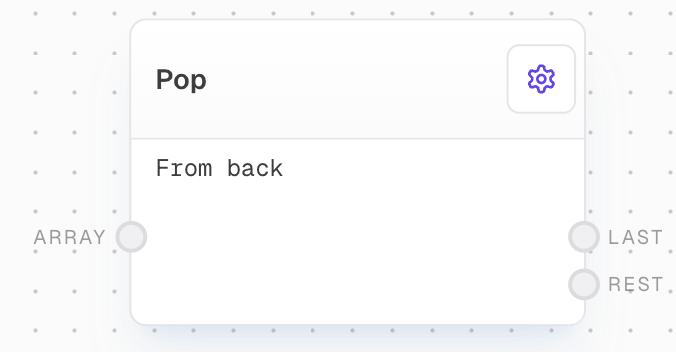
The Pop Block removes either the first or last element from an array and outputs both the removed element and the remaining array. By default, it pops the last element. This block is useful for processing array elements one by one in a loop.
## Key Features
* Removes and returns the first or last element of an array
* Outputs both the popped element and the remaining array
* Configurable to pop from the front or back of the array
* Useful for iterative array processing
## Inputs
The array to pop from. Required. Non-array inputs will not be coerced.
## Outputs
The popped element. Will be labeled as "First" if popping from front, "Last" if popping from back.
The remaining elements of the array after popping.
## Editor Settings
If enabled, the first element of the array will be popped instead of the last.
## Example: Pop the last element from an array
1. Create an Array Block with values `["John", "Doe", "30", "Engineer"]`.
2. Add a Pop Block and connect the Array Block to its `array` input.
3. Run the flow. The `Last` output should be `"Engineer"` and the `Rest` output should be `["John", "Doe", "30"]`.
## Example: Pop the first element from an array
1. Create an Array Block with values `["John", "Doe", "30", "Engineer"]`.
2. Add a Pop Block, enable the `Pop from front` setting, and connect the Array Block to its `array` input.
3. Run the flow. The `First` output should be `"John"` and the `Rest` output should be `["Doe", "30", "Engineer"]`.
## Error Handling
The Pop Block will error if:
* The `array` input is not provided
* The input is not an array
* The input array is empty
## FAQ
No, the Pop Block can only pop one element at a time. To remove multiple elements, use multiple Pop Blocks in sequence.
No, the Pop Block only works with arrays. For string manipulation, consider using a Code Block with custom JavaScript.
The Pop Block will error if the array is empty. Use an If Block to check if the array is empty before popping from it.
## See Also
* [Array Block](/block-reference/data/array)
* [Slice Block](/block-reference/modifiers/slice)
* [Code Block](/block-reference/advanced/code)
* [Loop Controller Block](/block-reference/logic/loop-controller)
## Overview
The Pop Block removes either the first or last element from an array and outputs both the removed element and the remaining array. By default, it pops the last element. This block is useful for processing array elements one by one in a loop.
## Key Features
* Removes and returns the first or last element of an array
* Outputs both the popped element and the remaining array
* Configurable to pop from the front or back of the array
* Useful for iterative array processing
## Inputs
The array to pop from. Required. Non-array inputs will not be coerced.
## Outputs
The popped element. Will be labeled as "First" if popping from front, "Last" if popping from back.
The remaining elements of the array after popping.
## Editor Settings
If enabled, the first element of the array will be popped instead of the last.
## Example: Pop the last element from an array
1. Create an Array Block with values `["John", "Doe", "30", "Engineer"]`.
2. Add a Pop Block and connect the Array Block to its `array` input.
3. Run the flow. The `Last` output should be `"Engineer"` and the `Rest` output should be `["John", "Doe", "30"]`.
## Example: Pop the first element from an array
1. Create an Array Block with values `["John", "Doe", "30", "Engineer"]`.
2. Add a Pop Block, enable the `Pop from front` setting, and connect the Array Block to its `array` input.
3. Run the flow. The `First` output should be `"John"` and the `Rest` output should be `["Doe", "30", "Engineer"]`.
## Error Handling
The Pop Block will error if:
* The `array` input is not provided
* The input is not an array
* The input array is empty
## FAQ
No, the Pop Block can only pop one element at a time. To remove multiple elements, use multiple Pop Blocks in sequence.
No, the Pop Block only works with arrays. For string manipulation, consider using a Code Block with custom JavaScript.
The Pop Block will error if the array is empty. Use an If Block to check if the array is empty before popping from it.
## See Also
* [Array Block](/block-reference/data/array)
* [Slice Block](/block-reference/modifiers/slice)
* [Code Block](/block-reference/advanced/code)
* [Loop Controller Block](/block-reference/logic/loop-controller)