> ## Documentation Index
> Fetch the complete documentation index at: https://docs.odella.ai/llms.txt
> Use this file to discover all available pages before exploring further.
# Loops
> Using loops in Odella workflows
Loops allow you to repeat actions in Odella, automating tasks in your legal workflows. While they may seem complex initially, they’re incredibly useful.
## What is a Loop?
A loop repeats a set of actions until a specific condition is met—similar to saying, "Keep doing this until I say stop."
### Simple Loop Example
The simplest loop in Odella repeats actions until a stopping point is specified.
Always connect an Output block to the 'Break' part of the loop to provide it with a clear stopping point.
## The Loop Controller
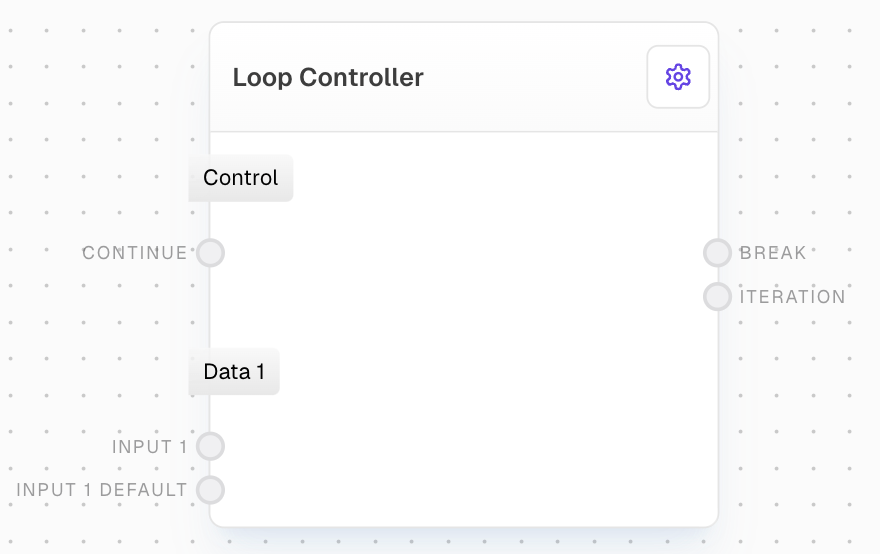
 The loop controller is the "brain" of your loop, managing how it operates. It’s the only block that can contain cycles of blocks, directing the flow of information through your loop.
### Key Parts of the Loop Controller
Controls whether the loop continues or stops, using a true/false value.
These are values that update with each cycle. Each pair has an input and an optional default input.
The default input provides an initial value, while the main input updates each cycle.
### Outputs in the Loop Controller
For each input pair (except 'Continue'), there’s an output. The first cycle uses the default value, while following cycles use the last output.
## Example: Loop in Action
Imagine a simple loop changing values 'A' and 'B'. In each cycle, 'A' and 'B' are updated, performing calculations or actions until a stop condition is met.
Be sure to add a stopping condition to avoid an endless loop. Odella will automatically stop the loop if a maximum iteration count is reached.
## Practical Uses for Loops
### Adding Items to a List
Loops can add items to a list, ideal for gathering information across multiple steps.
The Array Block is set to Flatten by default, making it easy to add new items with each cycle of the loop.
The loop controller is the "brain" of your loop, managing how it operates. It’s the only block that can contain cycles of blocks, directing the flow of information through your loop.
### Key Parts of the Loop Controller
Controls whether the loop continues or stops, using a true/false value.
These are values that update with each cycle. Each pair has an input and an optional default input.
The default input provides an initial value, while the main input updates each cycle.
### Outputs in the Loop Controller
For each input pair (except 'Continue'), there’s an output. The first cycle uses the default value, while following cycles use the last output.
## Example: Loop in Action
Imagine a simple loop changing values 'A' and 'B'. In each cycle, 'A' and 'B' are updated, performing calculations or actions until a stop condition is met.
Be sure to add a stopping condition to avoid an endless loop. Odella will automatically stop the loop if a maximum iteration count is reached.
## Practical Uses for Loops
### Adding Items to a List
Loops can add items to a list, ideal for gathering information across multiple steps.
The Array Block is set to Flatten by default, making it easy to add new items with each cycle of the loop.