

 Get Started
 Workforce
 Templates
 Documents
 Workflows
Activate deliberately
Insights covers all current and future inboxes connected to the account, subject to mailbox connection permissions. It is not a private toggle for only your mailbox. Only someone with permission to manage Insights can activate, pause, or resume it.1
Review eligibility and capacity
Check the displayed minimum inbox commitment, committed capacity, and account inbox count. Account entitlement and enough committed capacity are prerequisites to activation. Do not infer a price or automatic purchase from a screenshot.
2
Acknowledge the account-wide scope
Read and confirm the current-and-future-inbox acknowledgement. Review your organization’s authorization and privacy requirements before proceeding.
3
Request or activate
Select Request activation if entitlement/capacity is not ready, or Activate Insights when eligible. A request does not by itself turn on analysis or create a charge. Follow the commercial terms presented for your account.
4
Check preparation
Review each mailbox’s connection and history state. Owners must repair their own provider permissions. Wait for preparation before treating results as representative.
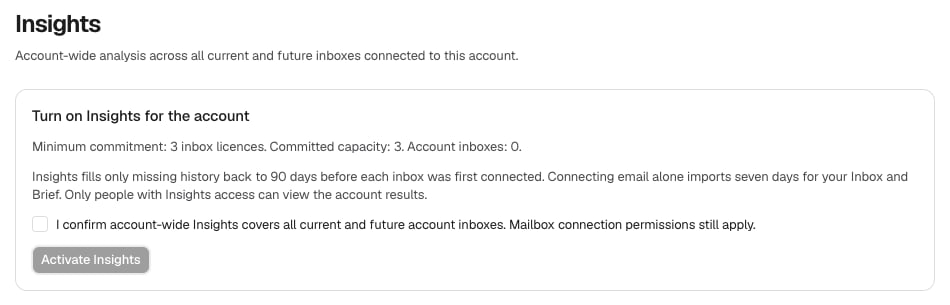
Account-wide Insights activation and capacity. Synthetic Storybook example, not a price quote or live result.
Understand preparation states
Insights fills missing history to the window displayed for each inbox, measured from when it was first connected. Ordinary email connection’s initial Inbox/Brief import is not proof that the longer Insights history is ready. Some inboxes are ready is partial coverage, not a complete-account result.