

 Get Started
 Workforce
 Templates
 Documents
 Workflows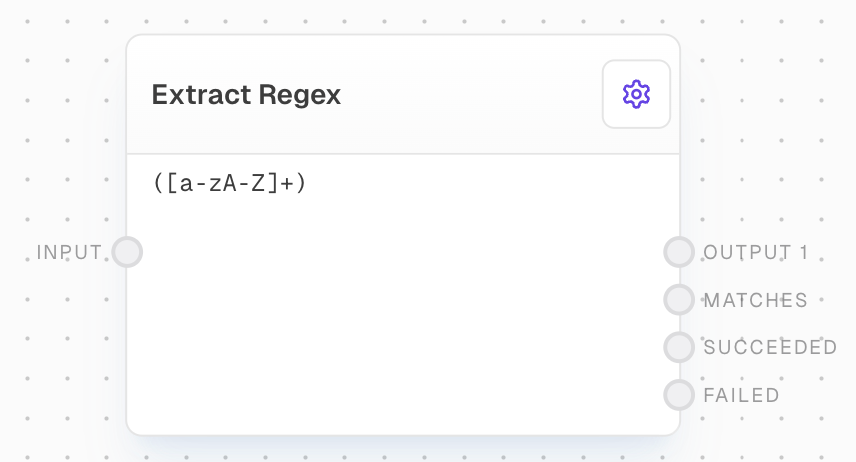
Overview
The Extract With Regex Block allows you to extract one or more strings from an input string using a regular expression. It’s useful for parsing responses from Language Models (LLMs), extracting specific values from files, or any scenario where you need to match patterns in text.Key Features
- Extract multiple strings using capture groups
- Configurable error handling for failed matches
- Support for multiline mode
- Flexible output options including all matches and success/failure flags
Inputs
string
required
The string to match the regex against. Non-string inputs will be coerced to strings.
string
The regular expression to use for matching. Only available when “Use Regex Input” is enabled in settings.
Outputs
string
One output port per capture group in the regex, containing the matched content for that capture group.
string[]
An array of all matched strings from the first capture group.
boolean
True if the regex matched the input string, false otherwise.
boolean
True if the regex did not match the input string, false otherwise.
Editor Settings
boolean
default:false
If enabled, the block will error if the regex doesn’t match the input string.
boolean
default:false
Enables multiline mode for the regex, affecting
^ and $ behavior.string
default:"([a-zA-Z]+)"
The regular expression to use for matching.
boolean
default:false
When enabled, allows the regex to be provided via an input port instead of being set in the settings.
Example: Extract a command from an LLM response
- Create a Chat Block with a System Prompt:
- Add an Extract With Regex Block and connect the Chat Block’s output to its input.
- Set the Regex to
!([a-zA-Z]+). - Connect the
Output 1port to a Text Block to display the matched command.
Error Handling
- The block will error if the input string is not provided or if the regex is invalid.
- If “Error on failed” is enabled, the block will error when the regex doesn’t match the input.
FAQ
How do I match a string that contains a special character?
How do I match a string that contains a special character?
For special characters like newlines, you can include them literally in the regex editor. They will be preserved in the regular expression.